Fairy Network Topology
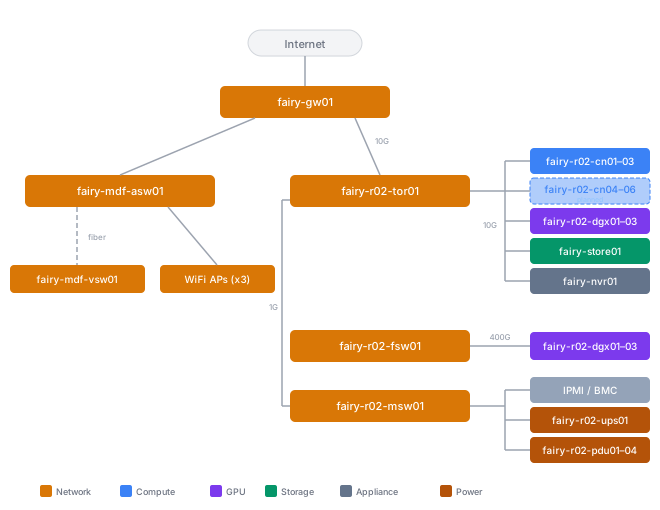
The fairy site uses 10GBase-T for compute and home network traffic, a dedicated 400G QSFP-DD fabric for GPU interconnect, and a separate 1G management network.
IP Addressing
Site Network
The network is flat — all devices share a single subnet. A separate guest network runs on VLAN 900 with its own subnet.
| Setting | Value |
|---|---|
| Subnet | 192.168.227.0/24 |
| Gateway | 192.168.227.1 |
| Guest VLAN | 900 |
Static allocations are carved out of the /24 by purpose:
| Range | CIDR | Purpose |
|---|---|---|
| .16–.31 | 192.168.227.16/28 | fairy-k8s01 nodes |
| .32–.39 | 192.168.227.32/29 | Storage nodes |
| .48–.63 | 192.168.227.48/28 | Kubernetes Multus (L2 pod IPs) |
| .128–.249 | — | DHCP pool |
Pod and Service Networks
| Network | CIDR |
|---|---|
| Pod IPv4 | 10.230.0.0/16 |
| Pod IPv6 | fd2b:ec92:e232::/48 |
| Service IPv4 | 10.229.0.0/16 |
| Service IPv6 | fd2b:ec92:e230:1::/112 |
| Cluster DNS (IPv4) | 10.229.0.10 |
| Cluster DNS (IPv6) | fd2b:ec92:e230:1::a |
DNS
DNS is managed entirely by fairy-gw01 (Firewalla). All clients on the network use the Firewalla as their resolver.
Network Segmentation
Fairy uses a two-tier model: a small number of networks (L2 segments) with device classification handled by groups within each network. Groups enforce differentiated policy without requiring per-category VLANs, and Firewalla's VqLAN provides device-level isolation where needed. This keeps service discovery protocols (mDNS, HomeKit, Thread) working without mDNS reflectors or multicast proxies.
Networks
| Network | VLAN | Purpose |
|---|---|---|
| Trusted | untagged | Primary LAN for all household and infrastructure devices |
| Guests | 900 | Isolated network for visitor devices — internet only, no LAN access |
The Trusted network is flat L2 — no further VLAN subdivision. Isolation inside Trusted is handled per-device and per-group by Firewalla, not by VLAN boundaries.
Device Groups
Device groups classify devices within the Trusted network and apply differentiated policy based on role. Groups control which devices can talk to which other devices, and what external destinations each device can reach.
| Group | Purpose | Connectivity |
|---|---|---|
| Home Control | HomeKit hubs, Hue bridge, Matter controllers, Thread border routers | Mostly wired with some WiFi — LAN access for discovery, vendor cloud egress |
| IoT | Smart bulbs, plugs, sensors, other "things" | WiFi — vendor cloud only, no LAN peer access |
| Cameras | UniFi Protect cameras, doorbell | Wired (doorbell is WiFi) — LAN to NVR only, no direct internet egress |
| Servers | Kubernetes nodes, storage, NVR, other infrastructure | Wired — full LAN + internet; permitted to reach specific IoT devices and Cameras |
| Users | Per-person group for each household member | WiFi — personal policy, content filtering, and schedules |
The Servers group has targeted exceptions to the default LAN-isolation policy that most IoT and Camera devices live under. Specific devices that would otherwise be cloud-only or NVR-only are reachable from Servers for automation and integration purposes. This is configured per-device rather than as a blanket group-to-group permission — Servers can reach the devices they need, nothing more.
User Groups
Each household member has their own user group. A user group behaves like a device group but is tied to a person's identity, which lets Firewalla apply consistent policy (content filtering, bedtime schedules, per-person tracking) as that person's devices come and go over time. A new phone joining with a user's WiFi password automatically inherits that user's policy.
Kubernetes pod integration
The fairy-k8s01 cluster uses Cilium CNI for pod networking, which places pods in a dedicated overlay (10.230.0.0/16) that's unreachable from the L2 network. Most workloads are fine with this — they consume and expose services through Kubernetes Services and Gateways. A few workloads need direct L2 access to the Trusted network for protocols that don't cross subnet boundaries (mDNS, HomeKit pairing, AirPlay, Thread).
These workloads use Multus CNI to attach a second interface directly on the Trusted L2 network, bypassing the pod overlay for that specific traffic.
| Workload | Why L2 is required |
|---|---|
| Scrypted | HomeKit bridge — mDNS advertisement, HomeKit pairing protocol |
Workloads using Multus are classified into the appropriate device group by MAC address, same as any other device on the Trusted network.
Device Classification
Devices are placed into groups by one of two mechanisms:
- WiFi password — multi-password SSIDs route devices to the correct network and group based on which password was used to join. This handles the majority of WiFi devices.
- MAC / device identity — some devices are classified manually in Firewalla by MAC address or by device fingerprint. This covers wired devices (which never join via WiFi) and WiFi devices that need to be in a specific group regardless of the password they joined with.
WiFi SSIDs
Two SSIDs serve the entire fairy site:
| SSID role | Bands | Purpose |
|---|---|---|
| General | 2.4 + 5 GHz | Most devices — IoT, home control, cameras, guests, and anything that doesn't need 6 GHz |
| User devices | 5 + 6 GHz | Personal devices — phones, tablets, laptops |
Both SSIDs are multi-password. The password used at join time determines which network and group the device lands in:
- Joining the General SSID with the IoT password → Trusted network, IoT group
- Joining the General SSID with a user's password → Trusted network, that user's group
- Joining the General SSID with the guest password → Guests network (VLAN 900), internet-only
- Joining the User Devices SSID with a user's password → Trusted network, that user's group
The General SSID carries 2.4 and 5 GHz because IoT devices and older hardware often require 2.4 GHz, and most don't benefit from 6 GHz. The User Devices SSID runs 5 and 6 GHz for modern client devices where Wi-Fi 6E provides meaningful throughput gains and where the device count is small enough that 6 GHz spectrum isn't wasted.